

How to Convert Speech to Text
How to Covert Speech to Text. Navigate to https://incushub.com/user/speech-to-text
This feature displays your current credit balance, allowing you to monitor your consumption and manage your IncusHub usage effectively.
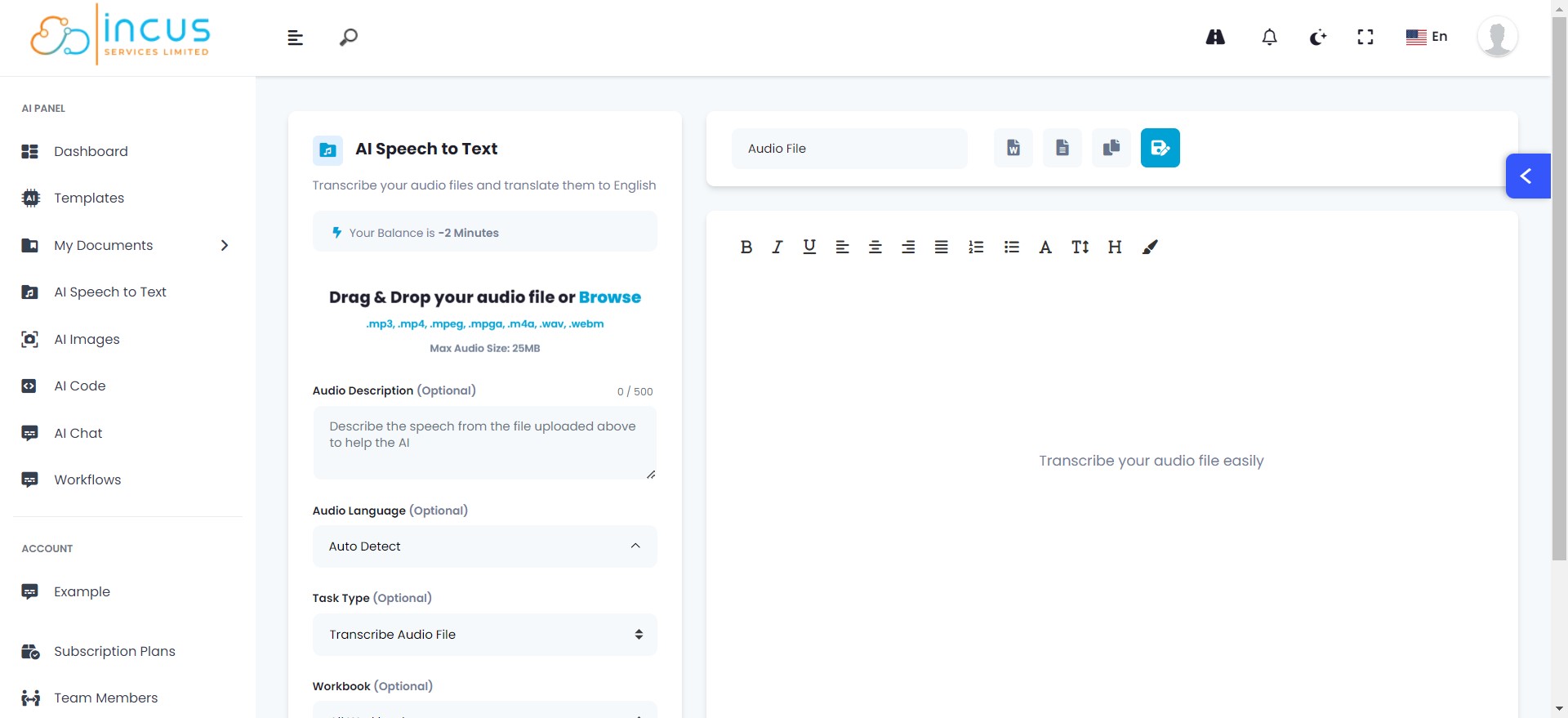
You can easily upload files by dragging and dropping, or browsing your device. With support for files up to 25MB, you can handle large and high-quality audio files for transcription.

This gives you an overview of the transcription task, helping you understand its purpose and requirements.

Set to auto-detect by default, this feature identifies the language in the uploaded audio file, ensuring accurate transcription across different languages.

Here, you can define the type of transcription task, such as dictation, conversation, meeting, etc. This guides the AI to handle diverse transcription requirements effectively.

This feature allows you to select the destination folder for the transcription file, helping you maintain an organized workspace.

A simple click starts the transcription process, converting your uploaded audio files into text effortlessly.

You can assign a unique name to your transcription file, aiding in easy identification and retrieval later.

The Export feature lets you download the transcribed text in a word or text format, providing flexibility in using and sharing the content.

The Export feature lets you download the transcribed text in a word or text format, providing flexibility in using and sharing the content.

This feature allows you to easily copy the transcription to your clipboard with a single click, saving you time and ensuring quick usage across different platforms.
The Save option stores the transcribed text on IncusHub for future reference, ensuring your work is never lost.
The integrated text editor enables you to make quick edits and formatting changes directly on the platform, enhancing convenience and productivity.